On this page
1. What are cookies?2. Why the platform does not need a cookie banner3. These are the cookies we use4. Cookies in Creators' Memberapps4a. Cookies on Flenski's marketing websites5. Managing cookies6. Changes to this Cookie Policy7. ContactCookie Policy#
Last updated: 1 August 2026
This English translation is provided for convenience only. The German version is the legally binding version and prevails in case of discrepancies.
This Cookie Policy explains which cookies and similar technologies Flenski FZCO, Building A1, Dubai Digital Park, Dubai Silicon Oasis, Dubai, UAE ("Flenski") uses on the flenski.io platform, why no consent is required for them, and how you can manage cookies. Additional information on the processing of personal data can be found in the Privacy Policy, section "Cookies and similar technologies".
1. What are cookies?#
Cookies are small text files stored in your browser when you visit a website. They make it possible to recognize your browser on subsequent requests — for example, so that you stay signed in or your requests are routed to the correct server. Cookies do not harm your device and do not contain any programs.
Some cookies are set by Flenski itself ("first party"), others by technical service providers that Flenski uses to operate the platform (here: Cloudflare as a security and delivery network).
2. Why the platform does not need a cookie banner#
Flenski uses only strictly necessary cookies on the platform. The legal basis for storing and reading them is Section 25(2) no. 2 of the German Telecommunications Digital Services Data Protection Act (TDDDG): consent is not required where storage is strictly necessary to provide the service explicitly requested by the user — here, the platform with sign-in, session management, and protection against abuse.
For all non-essential cookies (for example, for analytics or marketing purposes), Section 25(1) TDDDG requires prior consent. Flenski does not set such cookies on the platform by default — in particular, no marketing cookies, retargeting cookies, advertising pixels, or analytics and tracking cookies for marketing purposes. That is why the platform itself does not display a cookie banner: where only strictly necessary data is stored, no consent prompt is required.
3. These are the cookies we use#
The following table is the complete and authoritative overview of all cookies that may be set in the operation of the platform. Cookies that are only active in certain configurations (e.g. Load Balancing, Waiting Room, Always Online) are marked accordingly.
| Name | Provider | Purpose | Duration | Category |
|---|---|---|---|---|
| `accessToken` | Flenski (first party) | Stores the access token that keeps you signed in to the app; can be disabled via the "Stay signed in" toggle in your profile (Section 5). In embedded widgets it is set with SameSite=None so that the widget works in an iframe. | 30 days, rolling (extended with each active use) | Strictly necessary |
| `refreshToken` | Flenski (first party) | Renews the access token so that your session does not expire while you are using the platform. | 90 days, rolling (extended with each active use) | Strictly necessary |
| `masqueradeAccessToken` | Flenski (first party) | Maintains the session of the "View app as test user" admin feature, which lets an administrator review their app from the perspective of a test user. | 30 days, rolling (extended with each active use) | Strictly necessary |
| `masqueradeRefreshToken` | Flenski (first party) | Renews the session of the "View app as test user" admin feature described above. | 90 days, rolling (extended with each active use) | Strictly necessary |
| `_<hash>` | Flenski (load balancer) | Session affinity — routes all of your requests to the same backend server. For example `_1d52e`. | Session | Strictly necessary |
| `__cf_bm` | Cloudflare | Distinguishes humans from bots to protect the service against automated abuse. | 30 minutes | Strictly necessary |
| `_cfuvid` | Cloudflare | Separates requests from the same IP address so that rate limits apply per visitor. | Session | Strictly necessary |
| `cf_clearance` | Cloudflare | Records that a security check was passed successfully so that it does not appear again. | 30 min. – 1 year (depending on configuration) | Strictly necessary |
| `__cfruid` | Cloudflare | Supports rate limiting and request attribution at the network edge. | Session | Strictly necessary |
| `__cflb` | Cloudflare | Session affinity at the network edge. Only when Load Balancing is enabled. | Session – up to 24 hours | Strictly necessary |
| `__cfwaitingroom` | Cloudflare | Manages your place in the queue during periods of high load. Only when Waiting Room is enabled. | Depending on configuration | Strictly necessary |
| `cf_ob_info`, `cf_use_ob` | Cloudflare | Serves a cached version of the page when the origin server is unreachable. Only when Always Online is enabled. | Session | Strictly necessary |
Note on embedded widgets: When a Flenski widget is embedded in a third-party website via iframe, the browser sets the `accessToken` cookie with the SameSite=None attribute so that sign-in also works in the iframe context. As a result, the cookie is transmitted in a third-party context, but it remains a first-party Flenski cookie with an unchanged purpose.
Note on distinguishing the sign-in and masquerade cookies: The `accessToken` and `refreshToken` cookies (30 and 90 days, rolling) are the normal login persistence — they keep you signed in as a logged-in user ("stay signed in"). The masquerade cookies belong to the separate "View app as test user" admin feature. Also to be distinguished from these is the product simulation switch, which lets an administrator view their app the way a buyer of only one specific product sees it; each such simulation is valid for 1 hour. The durations stated in the table are correct.
Note on storing consent choices: The platform itself does not display a cookie banner and therefore does not store any consent selection (see Section 2). If a Memberapp displays a cookie banner, visitors' choices are stored as follows: for guests, as a local storage entry with the key "cookieConsent" in the browser (with no automatic expiry date — the entry remains until browser data is deleted); for signed-in members, in the user account. This storage is strictly necessary (Section 25(2) no. 2 TDDDG) so that the choice made is respected and not requested again on every visit.
4. Cookies in Creators' Memberapps#
The Memberapps on the platform are operated by the respective Creators (community operators); they are accessible under subdomains of the form name.flenski.app or name.flenski.net, or under a Creator's own domain — even where such an address contains "flenski" in its name, the provider of the app is the respective Creator. Creators can, on their own responsibility, integrate external services into their Memberapps — for example, analytics and marketing tools, tracking pixels (e.g. Google Analytics, Meta, TikTok, LinkedIn), embedded media content (e.g. YouTube, Vimeo, Loom, Spotify), as well as their own cookie banners and consent management solutions.
If a Creator integrates such services, additional cookies may be set that do not originate from Flenski and are not listed in the table in Section 3. In that case, the cookie notice or consent solution of the respective Creator applies. The respective Creator is solely responsible for selecting these services, obtaining any required consents, and complying with applicable data protection laws; in this respect, Flenski merely provides the technical platform. For information on the cookies used in a Memberapp, contact the respective Creator (Legal Notice and Privacy Policy of the Memberapp).
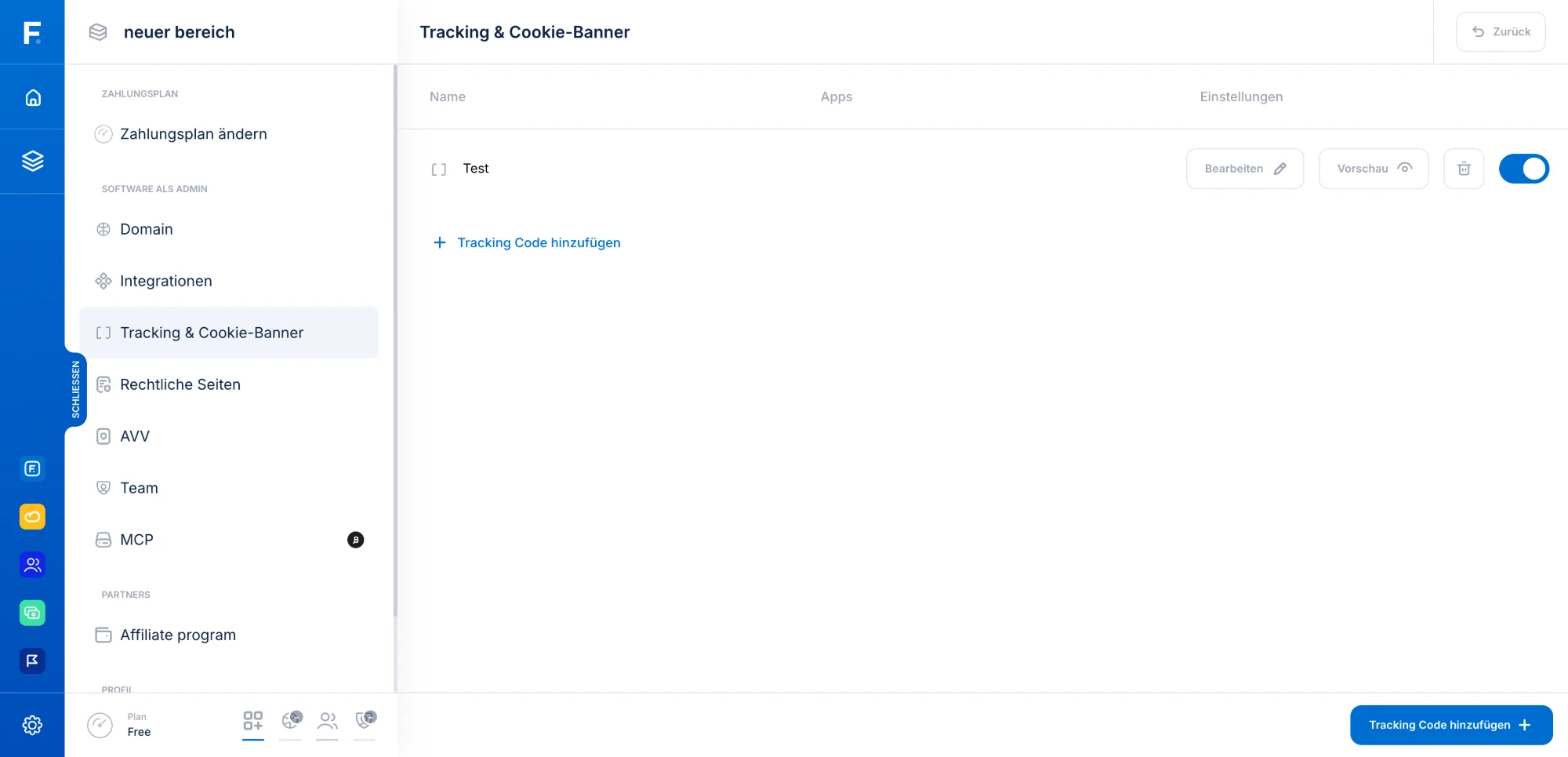
For this purpose, the platform provides a coupled banner-and-pixel mechanism under Workspace settings → Tracking & cookie banner: if the Creator sets up their tracking codes with the cookie banner enabled, consent-requiring codes only fire after the visitor has agreed in the banner ("Accept"/"Decline" presented as equals); via the "Cookie settings" link in the footer of the Memberapp, the selection can be changed or withdrawn at any time. If the Creator chooses the no-banner option for a tracking code, that code runs without a consent prompt — this is only permissible for strictly necessary integrations and, like any banner or consent solution of the Creator's own, is entirely the Creator's responsibility.
4a. Cookies on Flenski's marketing websites#
Flenski's own marketing websites (in particular flenski.io and its subpages) are to be distinguished from the platform. There, marketing and analytics cookies may also be used in the future (e.g. for Google Analytics, Google Ads, Meta Pixel, TikTok Pixel, KlickTipp, Calendly, FunnelCockpit, or WebinarJam) — but only after your consent via the cookie banner shown there (Section 25(1) TDDDG). The cookie banner of the respective page is authoritative; without consent, no such cookies are set. These marketing tools have nothing to do with the platform, the Memberapps, or the data processed there (see Privacy Policy, Section 27).
5. Managing cookies#
Changing consent choices in Memberapps: In Memberapps with an enabled cookie banner, the "Cookie settings" link in the footer of the app reopens the banner at any time — there, consents you have given can be changed or withdrawn with effect for the future.
Turning off "Stay signed in": In your profile you will find the "Stay signed in" toggle (enabled by default). If you turn it off, your sign-in will from then on end with the session; the long-term token cookies (accessToken/refreshToken, 30 and 90 days rolling) will no longer be set and existing ones become invalid.
Beyond that, the platform uses only strictly necessary cookies; there are therefore no further cookie settings to opt in or out of. However, you can manage cookies at any time via your browser:
- Delete cookies: In your browser settings, you can delete stored cookies individually or entirely.
- Block cookies: You can configure your browser to reject cookies in general or only from certain providers.
- Automatic deletion: Many browsers offer to delete cookies automatically when you close them.
Please note the consequences: if you delete or block the platform's cookies, you will be signed out and will have to sign in again. Without the strictly necessary cookies, the platform's sign-in, session management, and security functions do not work; the platform can then not be used, or only to a limited extent.
Instructions for managing cookies can be found in your browser's help pages (e.g. Chrome, Firefox, Safari, Edge).
6. Changes to this Cookie Policy#
Flenski updates this Cookie Policy when the cookies used or the legal framework change. The version published here at any given time applies; the date of the last update appears at the top of this page.
7. Contact#
If you have questions about this Cookie Policy or about data protection, you can reach us at: finn@flenskiteam.com. General inquiries: support@flenski.io.